This info is from manos at supermadolini.
Ok, below is info based on my own personal experience and mostly in a form of notes for setting up the site.
I acknowledge that this might not be for small budgets.
1. Buy a domain name.
Any company of your liking will do – nowadays buying a domain name for x amount of years is very cheap. It is always better if you keep domain name and hosting plan though under the same company so you don’t have too many people and bills involved.
2. Buy a hosting plan.
You need a company to provide you with a great service. There is nothing worse than going online and finding out that your site for some reason is down or submitting a support ticket and getting a lame answer after 72 hours. Not only all this reflects upon your business but can make customers flee. You also need a shop that runs fast when on high traffic so choose your hosting plan wisely. I would recommend a Linux based hosting plan with plenty of space and a company that can deliver. media temple for example is one of the best out there. Their prices are not the most competitive but from personal experience I’ve never had a better service in my life. Easy to setup, quick, a lot of options and a lot of space even under their standard account. They also provide a user friendly control panel that allows you amongst other things to view detailed information about the traffic coming in and out of your site with their Urchin system – something that you will surely appreciate since you will be checking it most of the time. Just have a look at their client list and you will get an idea who signs up with them.
3. Design your site.
You probably got the skills to design a site. If not, someone in your circle might be able to help you if not then hire one. Make sure to invest a lot of time and if you have the budget then use it – don’t go cheap. The looks of your site is the A and Z of your business, it is like the screen of your shop if you were to own one at a High Street. Needs to be attractive and clean in order to get people in and more important the site has to be easy to use. The shop serves as a tool for selling goods so people will want to find products quick and easy – this also reflects on your sales dramatically.
4. Build your website.
a. Custom solution. You can always hire a coder to make it for you by investing more money or build the site yourself if you got the skills. The choice is yours but the most important thing is that it has to have an easy to use administration back end and it works ok under most major browsers. It can be time consuming changing prices, updating info, changing pictures etc etc so the better the system the less time your spend on ‘keeping’ the shop – you will appreciate it in time especially if you are alone and running everything.
b. Buy an off the shelf application. When I was looking through applications that would allow me to run a full online shop I pretty quick realized that there are hundreds of them out there and most of them are and look like crap. The basic problem with all is that they don’t allow design freedom. They have default templates that allow you to change graphics, colors, etc but that’s it. If you want to make your site look different you will have to dig deep into the code of those templates and it can be frustrating the least.
What I did was to choose what I think is the best software out there at the moment in terms of running a shop and have another company shape the default templates based on the mock-ups I designed. The software is called Actinic and I bought the Business version. It will set you back quite a bit BUT you should think of it as an investment. It is a system that you could use for a long time and that provides everything imaginable – I recommend having a look on their site for a list of features. I will highlight stuff like: Stock levels, a cart, coupons, discounts, order possessing, invoices, descriptions, images, text, meta tags, customer accounts, customer groups, automated e-mails and integration with all major payment gateways. Finally as an application it is and feels very solid and robust.
The next step was to find the right studio to re-do the templates following my Photoshop mock-ups. That was not that difficult to do since Actinic has a list of certified partners that can do this type of job. It was expensive too but again I don’t regret it. I have now a shop that it is the way I envisioned it and run by a system that has all the bells and whistles.
5. Receive payments
I researched quite a bit on this matter when I first got the idea of opening the online shop and the clear winner was PayPal especially after it was able to accept Visa and credit card payments. I don’t care about the horror stories I hear on sites and all the negative crap which I wonder if it is true or not. They have extremely competitive prices and no setup or annual fees and up to this point their service has been fine. They take a cut from each payment ( PayPal Calculator ) and in our case we opened a business account with them which is altogether the best choice when you got an online shop.
If PayPal is a no, no then the next 3 best choices I could find which come I’m afraid with setup fees or annual fees or percentage fees depending the account are Verisign Worldpay, Protx
Need an E-Commerce Website?
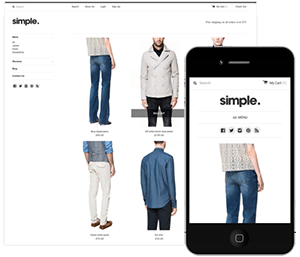 Shopify is perfect for beginners and experts. You don't need to have any technical or design experience to easily create a beautiful online store with your branding. Choose from tons of well designed e-commerce templates that look great on desktops, phones, and tablets. Easily customize, create pages, add products, and you're pretty much ready to accept payments. Plans come with a free no risk 30 day trial period.
Check out our in depth review of Shopify here and see why Shopify is our number 1 recommended shop for clothing companies.
Shopify is perfect for beginners and experts. You don't need to have any technical or design experience to easily create a beautiful online store with your branding. Choose from tons of well designed e-commerce templates that look great on desktops, phones, and tablets. Easily customize, create pages, add products, and you're pretty much ready to accept payments. Plans come with a free no risk 30 day trial period.
Check out our in depth review of Shopify here and see why Shopify is our number 1 recommended shop for clothing companies.